For anyone paying minimums on more than one balance
Which balance gets paid first, and in what month does each one reach zero?
Type in your balances, rates and minimums. Owelight shows which one to pay first, how much goes to each one every month, and the month each balance reaches zero if you keep making those payments. Every number comes with the reason behind it.
Shown with example numbers. No bank login: you type your own numbers.
If you've ever looked into paying off debt, you've run into that question. It has two well-known answers, the snowball and the avalanche, and people who will argue for either one.
There's something underneath that question, though. In the example on this page, it moves the finish line from month 98 to month 48, and switching the order doesn't move it at all: both orders end in the same month. Let's work it out together with example numbers, the way you'd work a problem on a whiteboard. You'll come away with something you can use on your own balances tonight, whether or not you ever buy anything from us.
First, the box on your statement
Pull up your most recent credit card statement and look for the box about minimum payments.
Card issuers are required to show how long it would take to pay off your current balance if you make no new charges and pay only the minimum, and how much you'd need to pay each month to pay it off in 36 months. That's from the Consumer Financial Protection Bureau's public Q&A. (We're citing the CFPB. We're not affiliated with it.)
If the first number in that box looks long, there's a reason. It's arithmetic, and it isn't a judgment about you.
Why paying on time can still stretch out
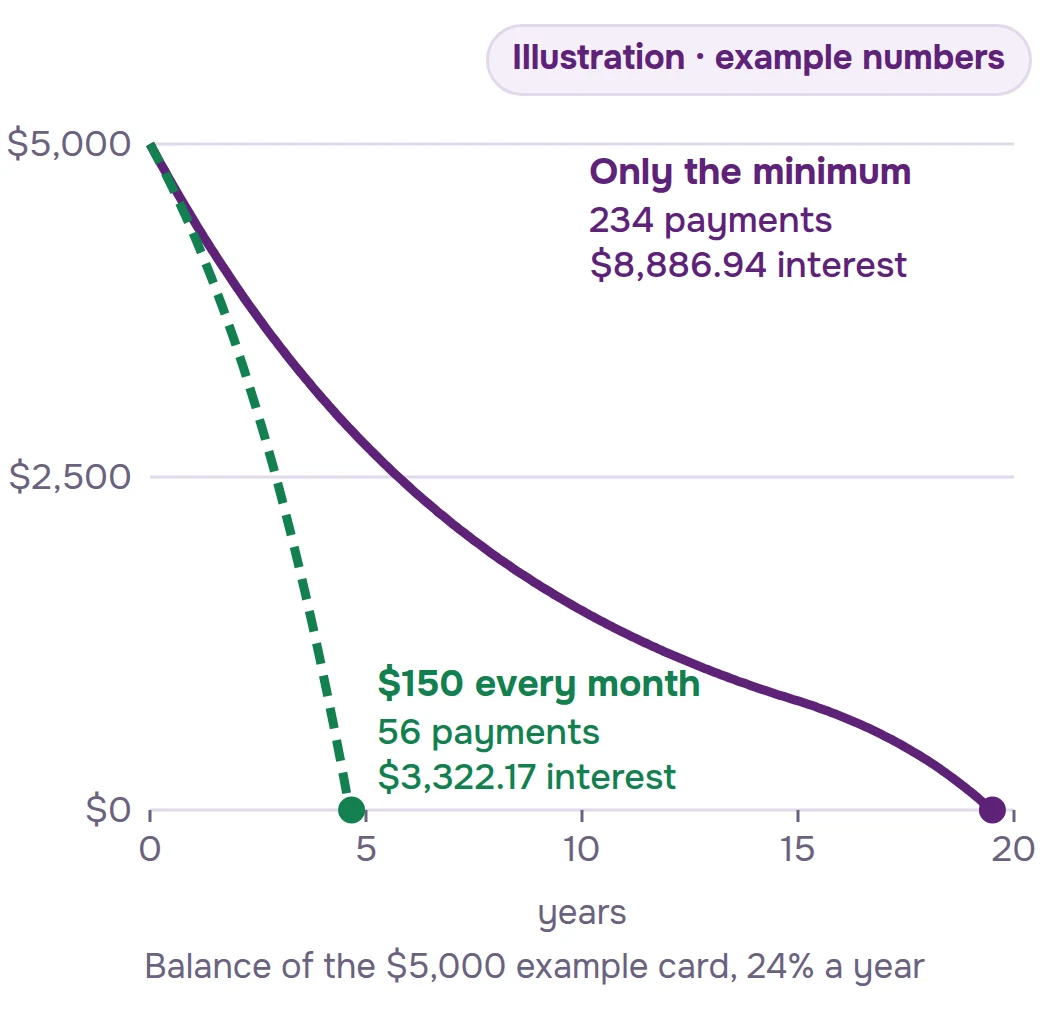
Here's one card. These are example numbers, not anyone's real account:
Balance: $5,000
Interest rate: 24% a year, which is 2% a month
Minimum payment: that month's interest plus 1% of the balance, or $25, whichever is more. Every card sets its own minimum; this is one example rule.
In month 1, the interest is $100, so the minimum is $150.
Now let's pay only the minimum. The balance goes down a little, so next month's interest is a little lower, so next month's minimum is a little lower, too. The payment shrinks right along with the balance. With these numbers, it takes 234 payments, about 19 and a half years, and $8,886.94 in interest.
Now let's pay that same $150 every month and not let it shrink. It takes 56 payments, 4 years and 8 months, and $3,322.17 in interest.
Same card, same rate. One thing changed: the payment held still.
Keep that in mind. The second half of the lesson starts when you have more than one balance.
The Rollover Schedule
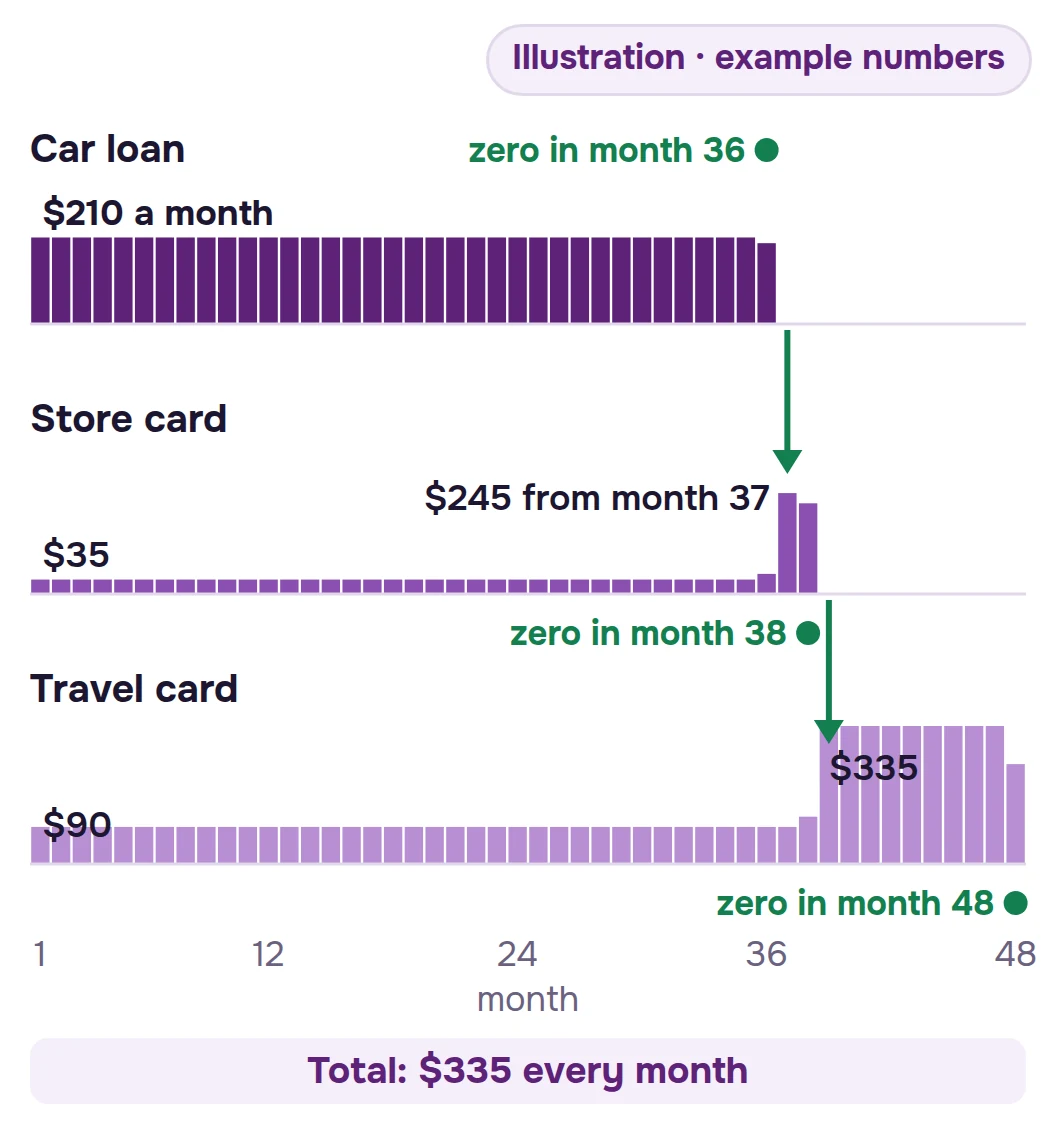
Let's take three balances. Again, example numbers:
Store card: $1,200 at 19.99%, $35 minimum
Travel card: $3,500 at 27.49%, $90 minimum
Car loan: $6,800 at 6.9%, $210 minimum
The three minimums add up to $335 a month.
Step 1. Pay each minimum and nothing more. Each balance gets its own minimum, the same amount every month, until it's paid off. The car loan reaches zero in month 36. The store card reaches zero in month 52. The travel card takes until month 98, more than 8 years in, and the interest adds up to $6,642.63.
Look at month 37. The car loan is gone, and so is its $210. You're now paying $125 a month instead of $335, and nothing told that $210 where to go next.
Step 2. Hold the total at $335 and roll it. Same three balances, same $335 every month, with one new rule: when a balance reaches zero, its payment moves to the next balance in line. For now, let's line them up smallest balance first; Step 3 compares orders. That move is the rollover. And that's the whole Rollover Schedule: hold your monthly total steady, and roll each paid-off balance's payment into the next one.
With that one rule, the last balance reaches zero in month 48 instead of month 98, and the interest comes to $4,487.47 instead of $6,642.63.
Step 3. Choose an order. Say you can put $500 a month toward these three: the $335 in minimums plus $165. That extra $165 has to go somewhere first, and this is where the famous question comes in.
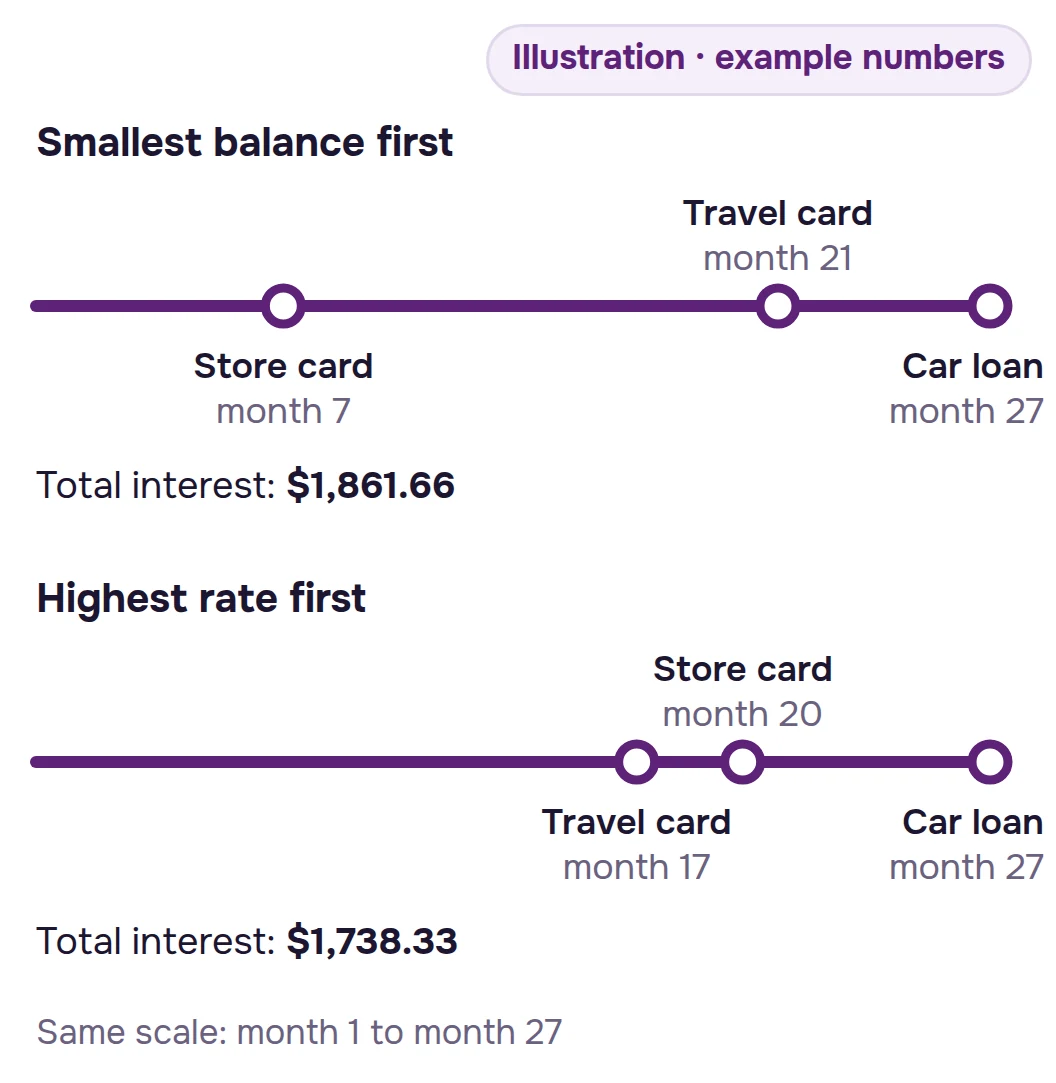
Smallest balance first (the snowball):
Months 1 to 6: $200 to the store card (its $35 minimum plus the $165 extra), $90 to the travel card, $210 to the car loan.
Month 7: the store card reaches zero.
Months 8 to 20: $290 to the travel card: its $90 minimum plus the $200 the store card was getting.
Month 21: the travel card reaches zero.
Months 22 to 26: $500 to the car loan: its $210 minimum plus the $290 the travel card was getting.
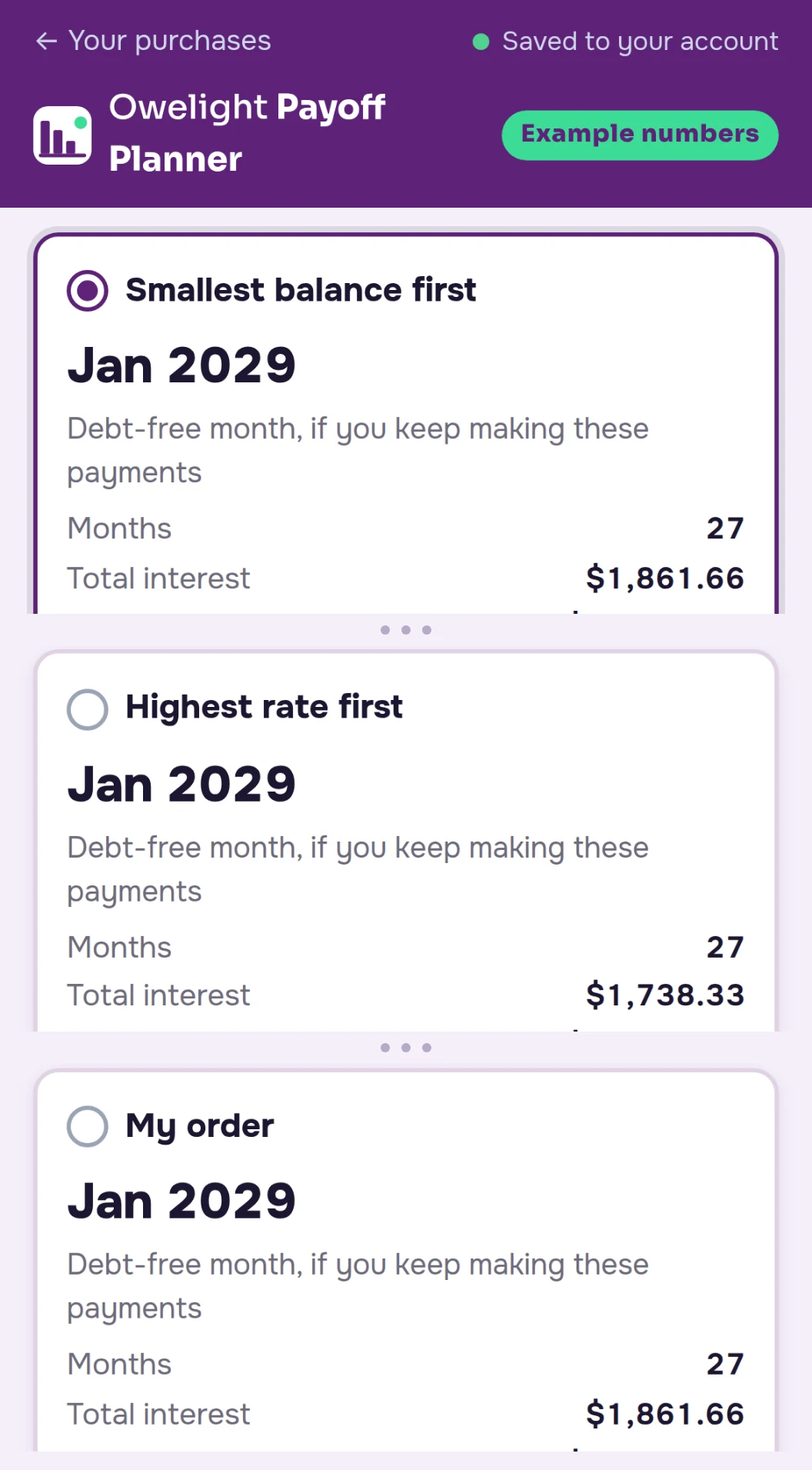
Month 27: the car loan reaches zero. Total interest: $1,861.66.
Highest rate first (the avalanche):
Months 1 to 16: $255 to the travel card (its $90 minimum plus the $165 extra), $35 to the store card, $210 to the car loan.
Month 17: the travel card reaches zero.
Months 18 and 19: $290 to the store card: its $35 minimum plus the $255 the travel card was getting.
Month 20: the store card reaches zero.
Months 21 to 26: $500 to the car loan: its $210 minimum plus the $290 the store card was getting.
Month 27: the car loan reaches zero. Total interest: $1,738.33.
So which order wins? With these numbers, both finish in month 27. Smallest balance first gets the first balance to zero 10 months sooner, in month 7 instead of month 17. Highest rate first costs $123.33 less in interest. Which of those matters more to you is your call. With your numbers, the gap could be smaller or larger, which is exactly why you'd want to see both.
Now look back at what moved the finish line. Paying only the minimums: month 98. Holding the total and rolling it: month 48. Adding $165 and rolling it: month 27, in either order. The order question is a real question. It's just the second one. The first is whether your monthly total holds steady when a balance reaches zero or a minimum shrinks.
One note, so the example stays honest. These schedules assume no new charges on these balances, rates that don't change, and that you keep making the payments. Interest here is figured as balance × rate ÷ 12 each month. Your card issuer may figure interest daily, so a real statement can differ by a few dollars, and your statement is the number to trust.
Now the same lesson, with your numbers
Everything above is public arithmetic. You could build it in a spreadsheet: one line per balance, a formula for each month's interest, a rule for where the extra goes, another for the month a balance reaches zero and its payment moves on. Then you'd redo it every time a balance changes.
Or you can type your balances into Owelight and let it lay out the schedule, with a note on each payment that says where it came from. One thing works differently from the one-card example: the planner keeps each minimum at the amount you type, and it doesn't shrink it. The shrinking minimum was there to explain the box on your statement.
Here's the example from this page, inside the planner:
The video uses the example numbers from this page. It has no voice; each step is written on screen.
The 30-Day Number Check
Put your real balances in. If what you see isn't useful to you, email us within 30 days for a full refund.
30-Day Money-Back Guarantee: email support@owelight.online within 30 days of your purchase and you'll get a full refund of what you paid for that product. You don't have to explain why.
What Owelight does with your numbers
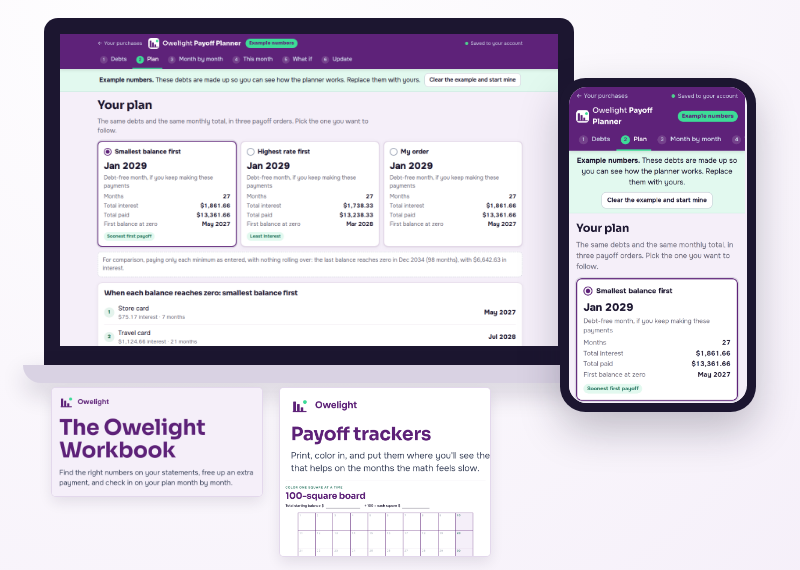
Three orders, side by side. Smallest balance first, highest rate first, and "My order," where you put the balances in any order you want. For each one, you see the month each balance reaches zero, the month the last one does, and the total interest.
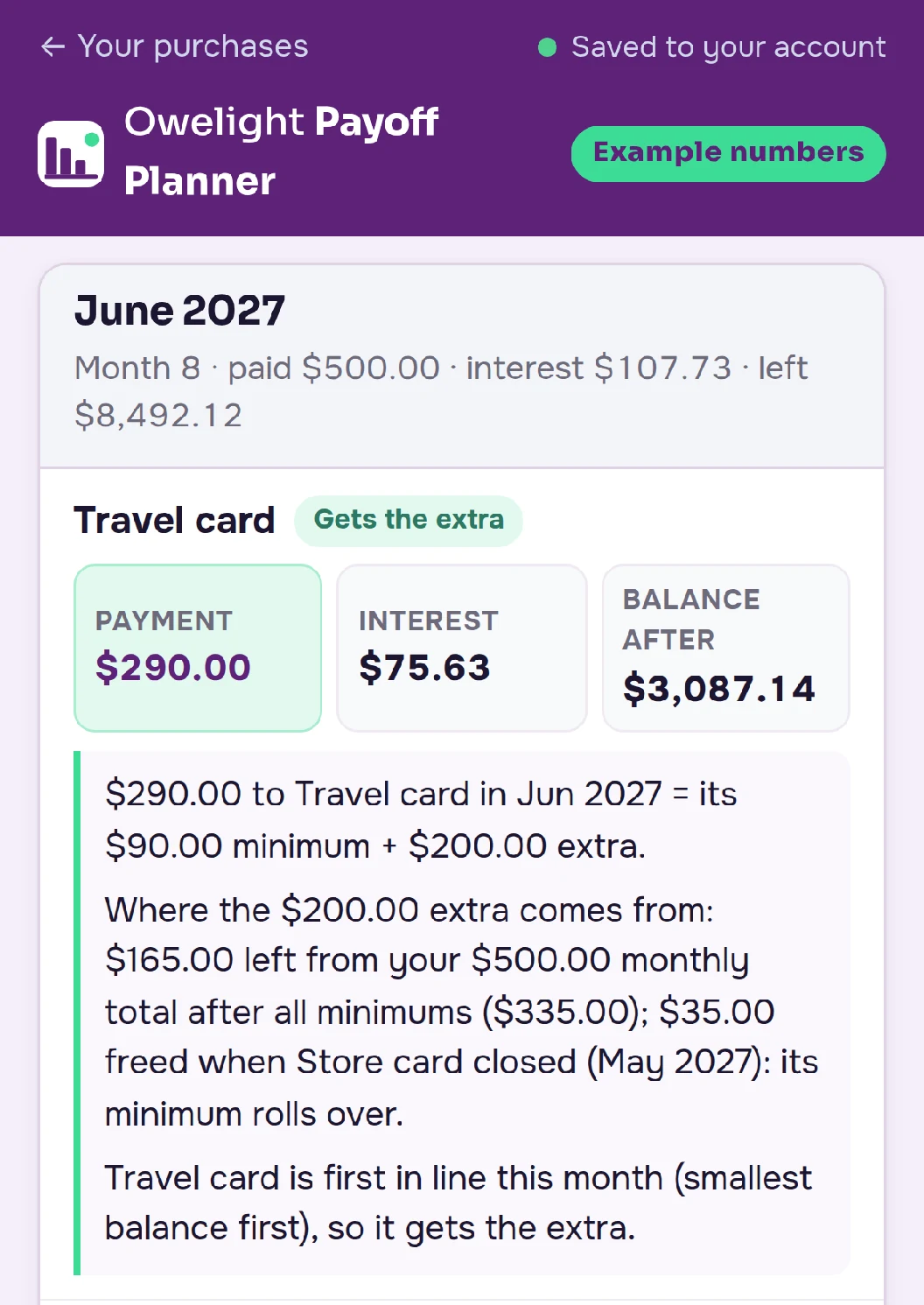
The reason behind every number. Each payment in the schedule comes with a note that says where the amount comes from. In the example above, the note for month 8 says the $290 to the travel card is its $90 minimum plus $200 extra: the $165 left from the $500 total after all the minimums, plus the $35 minimum the store card frees up when it's paid off.
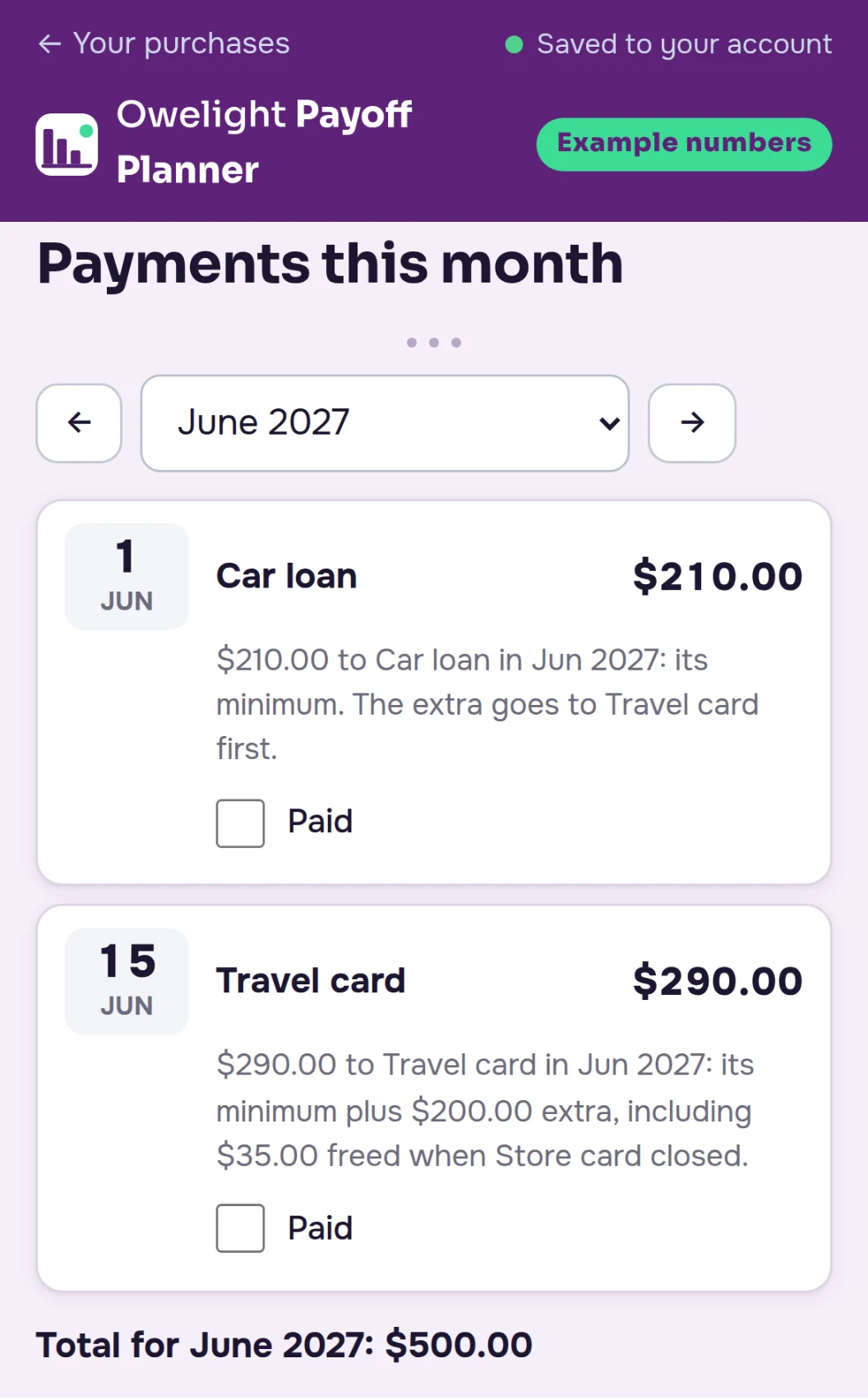
This month's payments, by due date. Which balance, how much, and the day it's due, in the order the due dates come.
Try an extra amount. Add $25 or $50 a month, or a one-time amount in a month you pick, like a tax refund, and see which payoff months move.
Promo rates with an end date. Enter a promo rate and the month it ends, and the schedule switches to the regular rate after that month.
Update it any month. Type in this month's actual balances, and the plan redoes the math from there.
A warning when the math can't work. If your monthly total is less than your minimums added together, the planner tells you instead of building a plan that can't be kept.
Print it or export it. A PDF of your plan to keep where you'll see it, and a CSV file if you want the numbers in your own spreadsheet.
Saved to your account. Open your plan on your phone or your computer and pick up where you left off.
A free calculator, a spreadsheet, or Owelight
The math behind a payoff plan is public, so here's an honest way to choose.
A free online payoff calculator costs nothing and answers fast. If one payoff date is all you need, use one.
A spreadsheet template costs a few dollars. If you like building formulas and keeping a spreadsheet up to date, a template may be all you need.
An app that connects to your bank can track your accounts for you. If that's what you want, Owelight isn't it: we never ask for a bank login. You type the numbers.
Owelight is for the person who wants the whole schedule laid out with their own numbers, all three orders side by side, the reason next to each payment, this month's payments by due date, and a plan that updates when the balances do, without building anything. That's what the $37 pays for.
Waiting costs nothing today. The box on your statement shows what the minimum costs over time.
The planner and the workbook, piece by piece
1. The Payoff Planner. It runs in your browser, on your phone or your computer. For each balance, you type the name, the balance, the interest rate, the minimum payment and the day it's due, plus a promo rate and the month it ends, if there is one. Then you type the total you can pay each month. Everything in "What Owelight does with your numbers" above happens here.
2. The Owelight Workbook. A 30-page PDF to print or fill in on screen:
Cover and how to use it (2 pages)
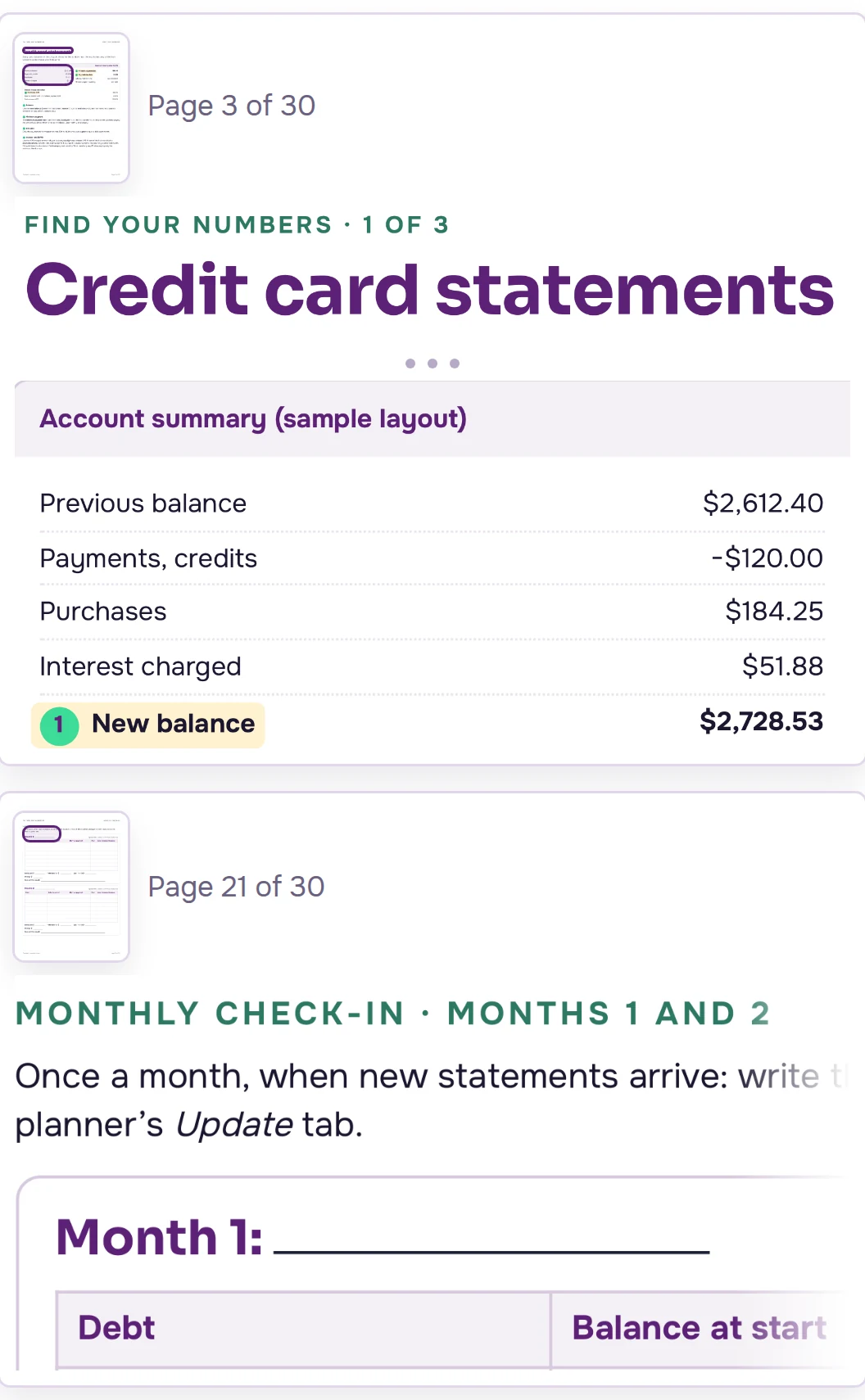
Where to find each number on your statement: balance, rate, minimum and due date (3 pages)
Your list of balances (2 pages)
A spending audit in three passes (6 pages)
The extra-payment finder, for looking through your month for an amount to try in the planner (5 pages)
A bill calendar (2 pages)
Monthly check-ins for 12 months (6 pages)
Notes and index (4 pages)
3. Payoff Trackers. An 8-page PDF: a blank thermometer to print for each balance, one for your total, and a 100-square chart to color in as the total goes down.
4. Email support. Questions about the planner or your order go to support@owelight.online. We answer within 2 business days.
Before you buy: what the planner needs, and what it won't do
The planner can work with your numbers if:
You have more than one balance: credit cards, a personal loan, a car loan, student loans, anything with an interest rate and a monthly minimum.
You can pay at least the minimums each month.
You want to see the order and the months laid out with your own numbers, and you'd like to know where each number comes from.
It's the wrong tool if:
Your monthly total can't cover all your minimums. A payoff plan needs at least that much, and the planner will tell you when the total is short.
You're looking for advice. Owelight isn't financial, credit or tax advice. It doesn't negotiate with lenders, consolidate balances, lend money or change your credit score. It does arithmetic on the numbers you type, in the order you choose.
You want an app that pulls in your bank transactions.
The arithmetic, in the open
Each month's interest is balance × rate ÷ 12. Each balance gets at least the minimum you entered. The rest of your monthly total goes to the first balance in your order, and when a balance reaches zero, its payment moves to the next one.
The schedule is an estimate built from the numbers you type. It assumes you keep making the payments in your plan and add no new charges to those balances. Rates change only when you enter a promo rate and the month it ends. Because your card issuer may figure interest daily, a statement can differ from the plan by a few dollars. When it does, type in the balance from your statement, and the plan picks up from there.
Before the planner went on sale, we checked its math against a free online payoff calculator, using the same numbers.
The Owelight Payoff Planner
The Owelight Payoff Planner — $37 USD, one-time payment
30-Day Money-Back Guarantee: email support@owelight.online within 30 days of your purchase and you'll get a full refund of what you paid for that product. You don't have to explain why.
Right after your payment goes through, we email your access link to the address you used at checkout.
Questions
Do I have to connect my bank?
No. You type each balance, rate, minimum and due day yourself. Owelight never asks for a bank login.
How do I pick an order?
That's your call, and the planner doesn't make it for you. Smallest balance first puts the extra on the smallest balance, so a first balance reaches zero early. Highest rate first sends the extra to the balance with the highest interest rate. "My order" lets you put a balance first for your own reasons. The planner shows the months and the total interest for all three, with your numbers, so you can compare before you choose.
Is this financial advice?
No. Owelight does the arithmetic on the numbers you enter, in the order you choose. It doesn't recommend a lender, a product or a payment amount.
Does it work for loans, not just cards?
Yes. Any balance with an interest rate and a monthly minimum: a personal loan, a car loan, student loans, a store card.
What if a promo rate is ending?
Enter the promo rate and the month it ends. After that month, the schedule uses the regular rate you entered.
Why doesn't my statement match the plan to the penny?
The planner figures each month's interest as balance × rate ÷ 12. Your card issuer may figure it daily, so the numbers can differ by a few dollars. Your statement is the number to trust: type in the new balance, and the plan picks up from there.
What if I use the card again?
The schedule assumes no new charges on those balances. If the balance goes up, type in the new number and the plan redoes the math.
What if I type something wrong?
Change it. Every number you enter can be edited, and the schedule updates. If your monthly total is less than your minimums added together, the planner warns you.
Can I use it on my phone?
Yes. It runs in your browser on a phone or a computer, and your plan is saved to your account.
How do I get it?
Right after your payment goes through, we email your access link to the address you used at checkout. The planner opens from your access page, and the PDFs are there to download.
Is there a subscription?
No. $37 is the whole price. Nothing renews, and nothing is billed later.
What if the planner isn't useful with my numbers?
30-Day Money-Back Guarantee: email support@owelight.online within 30 days of your purchase and you'll get a full refund of what you paid for that product. You don't have to explain why.
Who's behind Owelight?
Owelight makes the Payoff Planner, the workbook and the trackers. Your order is processed by Auryon369 (Fracktal Technologies LLC), our merchant of record, and the charge appears on your card statement as AURYON OWELIGHT.
Back to the question we started with
Smallest balance first, or highest rate first? It's a fair question, and now you know the one that comes before it: does your monthly total hold steady, and does each paid-off balance's payment roll into the next?
Owelight answers both with your numbers. You type in your balances. It lays out the schedule, month by month, with the reason behind every payment, for all three orders side by side.
P.S. Even if you don't buy today, look at the minimum payment box on your next card statement. That number, next to the payment you'd need for 36 months, is the first lesson on this page, written in your own numbers.